Assistant and agents
Ask it to show you.Or ask it to do it.
There is an assistant inside FABLS. Ask it to show you, and it points at the screen and says what it is pointing at. Ask it to do it, and it does. You can talk to it instead of typing. And when an AI agent of your own should work in a brand, the brand's owner decides how far it may go.

The assistant
Two ways to help.
You pick which.
Show me — it points and narrates
Ask how something works, and the assistant points at the part of the screen it means and narrates as it goes. For the questions that are easier read than asked, there is the Introduction tour and a Handbook of 17 articles.
Do it — it does the step
Say what you want done, and the assistant does it for you in the app. Show me or Do it: the choice is yours.
Full screen, with your conversations
Open the assistant full screen, with a list of your conversations beside it, when the question is a long one.
Hands-free voice
Talk to it instead of typing. Where the browser can recognise speech on your device, it happens there. Where it cannot, your words go through castomAPI one sentence at a time — and FABLS does not store them.
Generators
Start from a sentence.
Not from an empty form.
Four things AI can start for you, so you change a draft instead of staring at a blank page.
- Generate a writer with AIA persona to start from, ready to change. Or add one of five ready-made writers in one step.
- Generate a campaign with AIIt writes the campaign's brief. The plan is then made by the AI planner, by the free rule generator, or by you.
- Set up a channel with AIIt reads your website and finds where the business already posts.
- Brand factsFABLS learns the facts about your business from its website, or from a file — text, HTML, Word or PDF — and uses them to brief your writers.
Free AI tokens.
Every month.
AI writing, planning and the assistant run on AI tokens. Every month you get 100 of them free. When they run out, "Buy tokens" gets you more.
- 100free AI tokens, every month
AI agents over MCP
Bring your own agent.
The owner sets the rules.
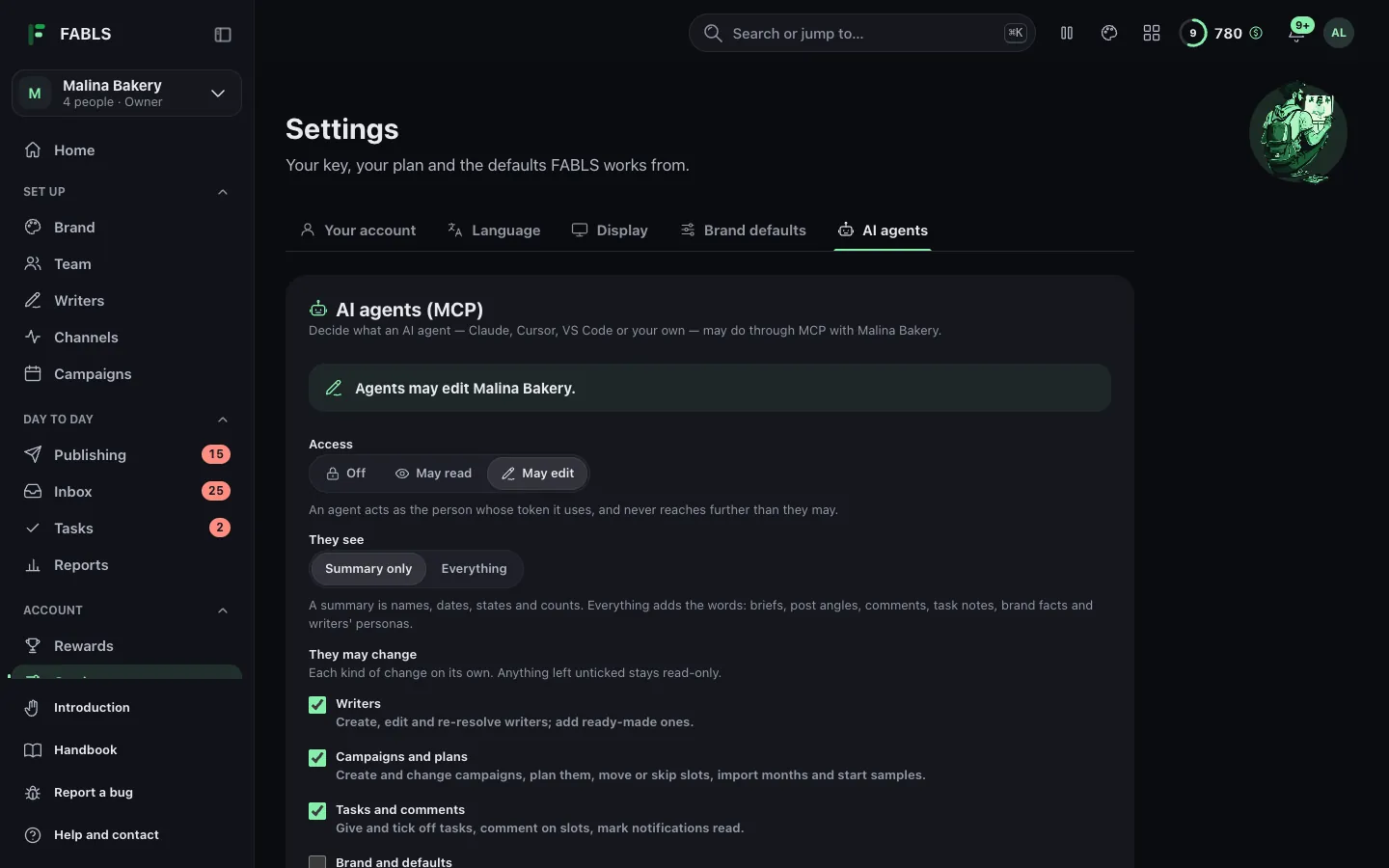
Claude, Cursor, VS Code and other MCP clients can work in a brand — as far as its owner allows, and no further.
Every brand starts closed. Its owner chooses whether agents are off, may read or may edit; whether they see a summary or everything; which kinds of change they may make; an end date; and house rules.
Each agent gets its own token, shown once. Every call it makes is written into the brand's agent activity, so nothing an agent does happens out of sight.
Since 0.19.0 an agent has the comments inbox as well: over MCP or the REST API it can list and read the comments, and draft, edit and send replies. It sends only when an owner or a manager connected it, and only if the brand's owner has let agents approve.
- 1AccessOff · may read · may edit
- 2SeesA summary, or everything
- 3May changeWriters; campaigns and plans; tasks and comments — on by default
- !Off by defaultBrand settings, channels, people, approving, removing
- 4UntilAn end date, and house rules
Every brand starts closedEvery call in the agent activity
The FABLS API
The same token.
A REST API as well.
The token you give an agent (in Settings, under AI agents) also works on the FABLS REST API, at https://api.fabls.io/v1, with its reference at https://api.fabls.io/docs. It works through castomAPI too, at https://app.castomapi.com/v1/fabls/, with a castomAPI key and the FABLS token in the X-Fabls-Token header. The same owner policy applies to all of it, and every call is written into the brand's agent activity.
- 1MCPToday: Claude, Cursor, VS Code and other MCP clients.
- 2REST APIToday: https://api.fabls.io/v1
- 3Through castomAPIToday: https://app.castomapi.com/v1/fabls/ with X-Fabls-Token
One token per agentThe owner's policy everywhere
Let it show you around.
Then let it help.
The assistant is in the app, and every month brings 100 free AI tokens to use it with.
Open FABLS What's new