Ads and boosts
Ads in FABLS.Your accounts. Your approval.
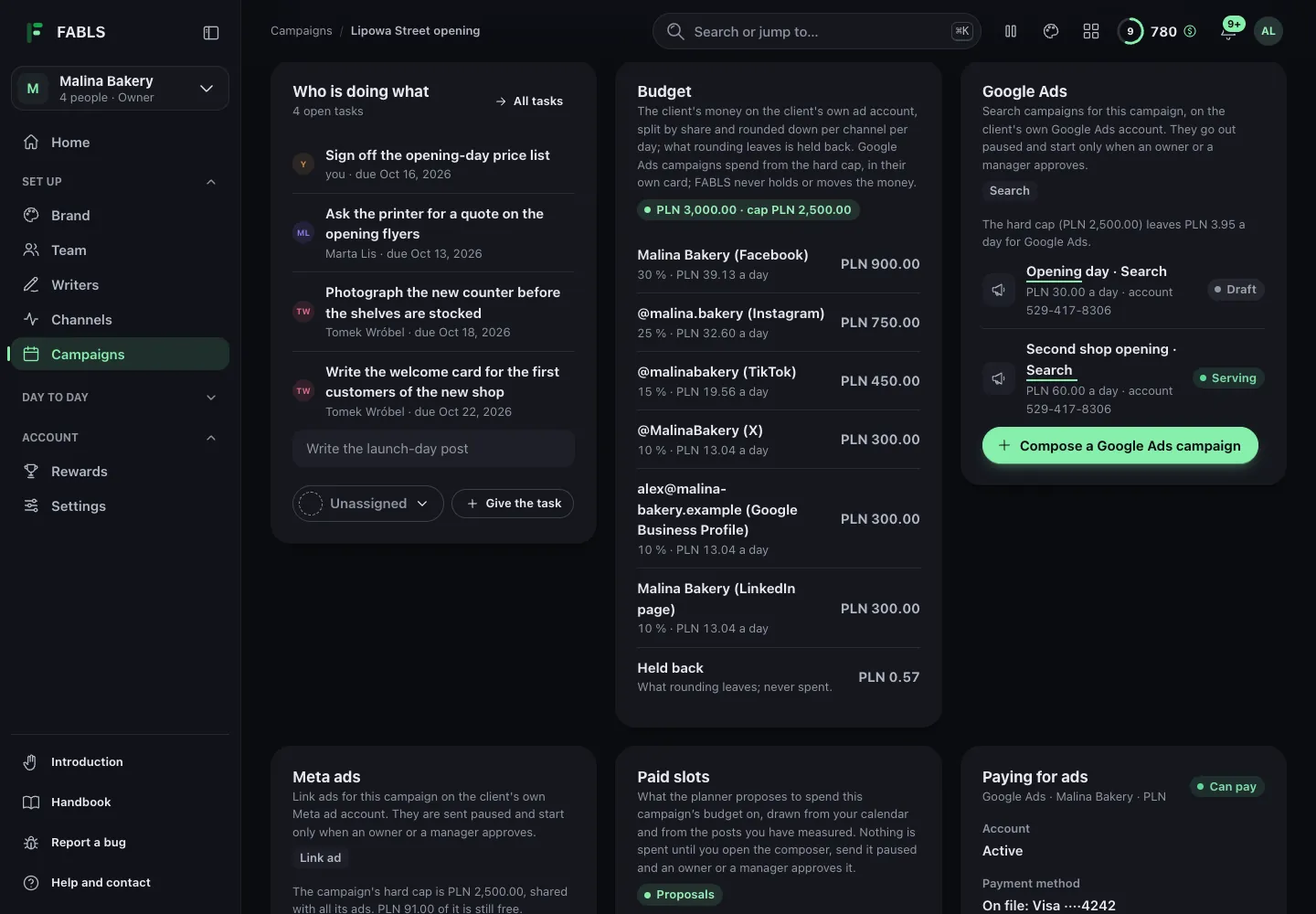
FABLS builds Google Ads search campaigns and Meta ads on your own accounts, and boosts a post that already went out: the budget, the audience, the keywords and the ad, all created paused. Nothing spends until an owner or a manager approves it, and you pay Google or Meta directly.

What you can do
A search campaign,
from the budget to the ad.
Search campaigns are the ads that can show when somebody searches on Google. FABLS builds those and no other kind of Google campaign.
A campaign with a daily budget
You compose it inside a FABLS campaign that is set to ads or both. Name it, pick the Google Ads account, set a daily budget in the campaign's currency, and choose how it bids: maximize clicks, or manual CPC. A maximum cost per click is optional with maximize clicks, and is the bid itself with manual CPC.
The daily budget stays within the FABLS campaign's hard cap, and the account has to bill in the campaign's currency. The campaign is created on your Google Ads account and starts paused. It is the same campaign you will see in Google Ads.
Where it shows, and when
Choose the location the ads are for and the language of the searchers. Set an ad schedule, read in the Google Ads account's own time zone, add negative keywords for the searches you never want, and give the campaign an end date. A campaign can carry two ads, so the two can be compared.
These are search campaigns. Display and Performance Max are not here.
An ad group, and the keywords it answers
A campaign has one ad group, named after the campaign unless you name it, and the ad group holds the keywords it should answer. For each keyword you choose how closely a search has to match it: exact, written in [square brackets], phrase, written in "quotes", or broad, written as it is. A campaign takes up to 50 keywords.
Responsive search ads
Write three to fifteen headlines of up to 30 characters and two to four descriptions of up to 90, give the final URL, and add up to two path fields, 15 characters each, that Google shows after the web address. A counter beside each field shows how much room is left.
Google mixes your headlines and descriptions to find the combinations that work, so the more distinct ones you write, the more it has to try.
Or have a writer draft the ad and the keywords from the campaign's brief and your brand facts. It is a suggestion on the brand owner's castomAPI tokens, nothing is sent anywhere, and every line is yours to read and change: claims and prices are yours to confirm.
Pause, approve, change the budget
"Send to Google Ads (paused)" creates the campaign on your account, paused. An owner or a manager then presses "Approve and start", and the approval is recorded with their name. Pausing is open to anyone who can write, and spends nothing from then on; starting it again takes an approval. A new daily budget is an approver's decision too, within the campaign's hard cap.
Performance, for the dates you pick
"Show the numbers" reads a campaign's cost, impressions, clicks and conversions from Google for a date range you choose. The numbers are the ones Google reports; FABLS adds nothing to them. Each look costs one castomAPI token, and conversions stay at 0 until conversion tracking is set up on the site you advertise.
An ad account is not a channel. It takes nothing from your plan's channel count, and a campaign on it is not part of the publishing queue, because a post is published to a channel while an ad is a campaign on your own ad account. Google Ads is first on this page because it needs the most setup. Meta comes next.
Meta
Boost a post.
Or compose the whole ad.
A post that is live on your Facebook Page or your Instagram account can be boosted: promoted as it is, with a Meta ad bought on your own ad account. You choose what the ad is for, engagement, traffic or awareness, a daily budget for one to thirty days, and an audience: broad, adults 25–54, young 18–34, or your own countries and ages.
A FABLS campaign set to ads or both can also be composed as a Meta ad of its own, with a campaign, an ad set and an ad, and the pictures FABLS can draw as its creatives. Both are created paused. Starting one is an approval by an owner or a manager, recorded with their name, and a bigger budget is another approval.
The daily cap is the FABLS campaign's, shared by its Google Ads and Meta spend, and it is held by the database, not just on screen. The money is yours and never passes through FABLS. "Show the numbers" reads spend, impressions, reach and clicks from Meta for the days the ad served.
- 1Pick a live postA Facebook Page post or an Instagram picture. A story, a reel or a post that is not live is refused, and the refusal says which.
- 2Set the budget and the daysChecked against the campaign's cap before anything is sent.
- 3Choose the audienceA preset, or your own countries and ages.
- 4Send it pausedCreated once on your Meta ad account, paused.
- 5Approve and startAn owner or a manager says yes, and the days start at the yes.
You pay Meta, not castomoAds never go on autopilot
The money
You see whether it is funded.
FABLS never holds the money.
An ad that stops because the card failed is a quiet way to lose a week. So each ad account in FABLS shows its payment status, and what is left of the balance where the platform reports one. When a campaign is about to run dry, or an account has a payment problem, FABLS warns you before the campaign stops rather than after.
Next to the status is a link to the platform's own billing page, in Google Ads or in Meta, because that is where money is added. FABLS reads the status and shows it; it cannot add funds, move funds or hold any. The account, the card and the invoice stay yours.
- 1Payment statusActive, or what the platform says is wrong with the account.
- 2Balance leftWhat remains to be spent, where the platform reports it.
- !WarningBefore a campaign runs dry, not after it stops.
- 3BillingA link to the platform's own billing page, to add money there.
Read from the platformFABLS never holds money
Nothing spends
until a person says so.
A campaign or a boost FABLS creates starts paused. It is staged on your Google Ads or Meta account, shows no ad and spends nothing, and it goes live only when an owner or a manager approves it. Ads never go on autopilot, and an AI agent cannot start a campaign or change its budget.
That is the same promise as everywhere else in FABLS, and it matters more here, because a post that goes out by mistake can be deleted, and an ad that runs by mistake has already cost money.
You choose the budget, the bidding, the keywords and the words of the ad yourself, in FABLS. FABLS enables nothing by itself. Google or Meta then runs the auction and bills you for the clicks, and castomo never pays for one.
- 1Campaign"Celebration cakes". Search, maximize clicks.
- 2BudgetA daily budget you set, with a maximum cost per click if you want one.
- 3Ad group"Order a cake". Two keywords: "celebration cake order" as phrase, [birthday cake bakery] as exact.
- 4The adThree headlines, two descriptions, a final URL on your own site.
- !WaitingPaused. Nothing is spent until an owner or a manager approves it.
Staged, then approvedOn your own Google Ads account
Setup guide
Bring your own account.
Connect it once.
FABLS does not lend you a Google Ads setup. You connect your own: your Google Ads account, your developer token and your Google Cloud OAuth client. It is deliberate. Your quota stays yours, your spend stays yours, and no other business's mistakes can use either of them up.
- A Google Ads accountA standard account or a manager (MCC) account, with billing already set up in Google Ads. Google charges your ad spend there.
- A developer tokenYou find it in Google Ads under Tools and settings, Setup, API Center. Google shows the API Center in a manager account, so create one first if you only have a standard account. A new token can only work on test accounts; for your real account it needs Basic access, which Google approves on request.
- A Google Cloud OAuth clientIn a Google Cloud project, switch on the Google Ads API and create an OAuth 2.0 client of the Web application type. You end up with a client ID and a client secret. To sign in with Google from FABLS, register https://app.fabls.io/ as an authorized redirect URI on it; if you would rather paste a refresh token you made yourself, you need no redirect address.
Connecting takes
a few minutes.
With the three things in hand, the connection is made in the app. What you type goes to castomAPI in one request, which checks it with Google and keeps it sealed and refreshed; FABLS does not store or log it, and the dialog empties itself when it closes.
FABLS can work only on the Google Ads accounts your credentials can reach, and on nobody else's. You can disconnect whenever you like. Campaigns already on Google Ads keep running as they are, so pause them first if they should stop.
The slow part is not the connecting. It is waiting for Google to approve the developer token for Basic access, which is Google's decision and on Google's schedule, so apply for it before you need it.
- 1Open ChannelsIn the app, open Channels, then the "Connect a channel" tab, and find the Google Ads card.
- 2Connect Google AdsPress "Connect Google Ads". A dialog opens.
- 3Enter your developer tokenThe one from your API Center. If you act through a manager account, add its ten-digit ID too.
- 4Give Google's permissionChoose "Sign in with Google", enter your OAuth client ID, press "Open Google's sign-in" and allow access. You come back to the app with Google's code; enter your client secret and developer token again and press "Connect Google Ads". Or choose "I have a refresh token" and paste one made with your own OAuth client.
- 5CheckcastomAPI checks it with Google, and the card lists your account as active, with the accounts your credentials reach.
Your token, your clientDisconnect whenever you like
Costs and limits
Whose money it is.
Whose quota it is.
- The ad spend is yoursGoogle bills it to your own Google payments setup, and only the campaigns you enabled can spend it. castomo never funds an ad, and FABLS never pays Google on your behalf.
- The calls are on a walletEvery call FABLS makes to Google Ads or Meta for you, whether it reads numbers or creates a campaign, is a castomAPI call on the wallet of the person who composed the campaign, and it runs on purchased castomAPI tokens rather than free ones alone. Composing a draft costs nothing. When Google itself fails to answer, that call is not charged.
- The quota is yoursGoogle gives each developer token a daily allowance of operations; on Basic access it is 15,000 a day. It is your token's allowance alone, so no other business using FABLS can use it up.
What to expect
FABLS is where you compose the campaign and where a person approves it. Google is where the auction happens, and Google reviews every ad on its own terms: an ad can be held back or refused, and then the reason is Google's to give.
What a click costs and what it brings depends on your keywords, your budget, your site and everyone else bidding on the same searches. FABLS does not decide any of that for you, and it cannot promise a result.
For a campaign you want to manage in depth, Google Ads itself is still the place. FABLS covers what a small business does most: build a search campaign, keep it paused until it is ready, switch it on, watch the numbers and switch it off. Once a campaign is on Google, the words of its ad are changed in Google Ads, not here.
The honest bit: the first campaign is mostly the setup, and the setup is mostly waiting for Google. Get the developer token and its Basic access in hand before anything else, and the rest is an afternoon.
When it goes wrong
The messages,
in plain words.
When Google or castomAPI refuses a step, FABLS says what went wrong and what to do next. These are the ones you are most likely to meet, and what each means.
Where Google itself refused a value, such as too few headlines or a budget it would not take, FABLS shows Google's own message, so you can fix that field and send it again.
- 1Token not approved for Basic accessGoogle has not approved your developer token for real accounts yet. Apply for Basic access in your manager account's API Center. Until Google approves, the token works only on test accounts.
- 2Top up the walletYour castomAPI wallet has no tokens left for the call. Add credit to it and try again.
- 3Rate limitGoogle is limiting how fast your token or your Google Cloud project may send requests. Wait a minute and try again.
- 4Reconnect Google AdsGoogle no longer accepts the credentials you connected. Connect Google Ads again from Channels.
- 5Account not foundThe account is not one your sign-in can reach. FABLS does not touch an account that is not yours.
- 6Already removedThe campaign or ad group was removed in Google Ads and cannot be changed. Create a new one.
- 7Google is not answeringGoogle Ads is down or sent something unreadable. Try again in a minute; that call is not charged.
- 8Check Google Ads firstThe answer to a step was lost, so nobody knows whether it reached Google Ads. Open the account and look before you send again; if you send again anyway, the campaign may appear twice.
- 9Your plan does not include running adsComposing a campaign is free. Sending it to Google Ads needs Pro or Business.
Google's own words where it refusedFix the field, send it again
Nothing spends
without you.
Ads are in the app now. For Google, begin with the two things Google takes time over: a developer token with Basic access, and the OAuth client. For Meta, connect your ad account and press Boost on a post that is live.
Open FABLS Channels